
RustDesk still does not support encrypted connections when self hosting: https://github.com/rustdesk/rustdesk/issues/3714
I think you bring up a fine point. Most applications have encryption built in and transparent to the user. While technical IT people in charge of infrastructure will not make this assumption, it is not unreasonable, at the same time, for small business / individual users, to not understand or know of this limitation.
VNC does not, for example, and you need to set up port forwarding through ssh. X2Go does....but I don't trust it terribly. So, RustDesk..what do you need to wrap it in? ssh?
I really want a better solution that VNC/X2Go..especially since I use hardware accelerated apps that need to use VGL to operate correctly (but underwhich operation is quite buggy).
Tailscale, or any encrypted mesh overlay is perfect for this. Infact I prefer it that way. Rustdesk can do what it does best at its core.
I disagree, modern software should make encrypted connections over something like HTTP3 or QUIC directly so true secure end to end connectivity works. This would make VPN software such as tailscale obsolete.
One of my primary use cases for tailscale/VPN is that I can happily run stuff (grafana, gitea, etc) and not have to be panicked about monitoring for CVEs - I serve it all over HTTPS but I don't want to put it on the public internet if I don't need to.
I'm also in favor of adding encrypted connections to RustDesk, not to replace tailscale, but as a part of this complete breakfast. Tailscale provides mutually authenticated, authorized L3 access. TLS can be configured to provide mutually authenticated L4 access. With a little OIDC/webauthn setup, both L3/L4 support device attestation, meaning there's no way to connect without e.g. a yubikey (or perhaps an enrolled TPM.)
So I'm supposed to set up PKI before I can open a remote console connection?
Please just make it work seamlessly with my existing SSH credentials. Like SFTP.
You could just make use of public oidc/oauth2 providers like Google/Github/Microsoft/Cloudflare Generic OIDC or heck, even your bluesky account via ATProto oauth
But yeah, you could also make use of your ed25519 ssh public key as client certificate and accept based on fingerprint like ssh
agreed, zero-trust solution with proper endpoint security and PKI is superior to transport encryption and insecure protocols
so without tailscale or any other intermediary turn service how does my computer behind a NAT connect to another computer behind another NAT
Ideally using ipv6 without NAT, but yeah hole punching or quic address discovery like iroh does works too
by using something like iroh.
basically an embedded tailscale.
Would be nice if they did support that, but on a LAN you can always encrypt at layer 3 with WireGuard.
>does not support encrypted connections when self hosting
Factually incorrect. If you self host a relay/coordination server - encryption works as documented.
Your statement is not entirely accurate. This only applies when using Direct IP Access on local networks, which is off by default. Their justification and invitation to PRs is the final comment [1] on the issue you linked. Why are you leaving this information out of your comment?
1 - https://github.com/rustdesk/rustdesk/issues/3714#issuecommen...
It may only apply to Direct IP Access, but isn't that what many would expect (not trusting middleman to be secure?)
Have you tried reading the docs?
>RustDesk is a single open-source application (AGPL) with its own architecture. Clients connect outward to an ID/rendezvous server, which brokers a peer-to-peer or relayed session. Per the RustDesk documentation, traffic is end-to-end encrypted (built on NaCl)
Not yet...good to chastise me on this, but in my defense, I am at work, and am just trying to get a sense of this, as I would like to move away from VNC.
I still think its an essential feature for self-hosting, but they seem to be open to PRs so what is the problem?
Btw does RustDesk support microphone input passthrough from client to the host yet?
So far it's only feature I found missing compared to proprietary solutions.
I have a Raspberry Pi hooked up to my TV and whenever I need to control it from my laptop (getting and interacting with the same screen on my laptop that I see on my TV) I have been using VNC. It is quite slow. Would this work better for that use case or is it really intended for something different? (And if the latter are there better solutions than VNC for what I want to do?)
Yes this will give you similar results.
There's VNC and VNC-likes (rdp, steam link, rustdesk, etc) which all do similar: stream a screen, allow remote keyboard/mouse, maybe redirect sound, maybe use video encoders.
There's also things like deskflow, which allow you to use one keyboard/mouse and control with multiple machines.
If you can look at your TV instead of your laptop, I highly recommend using KDE Connect
I have used Remmina over SSH and Tailscale (and generally don’t trust remote desktop tools), which is mentioned in various places by my operating system provider.
How does RustDesk compare with that?
It's not VNC-based, so the performance is much better. It also supports multiple monitors.
Thanks!
GNOME Remote Login runs an RDP server, and RDP indeed isn’t fast enough, although is TLS-encrypted.
What is rustdesk and how is it distinct from vnc?
Edit: i appreciate the explanations; thank you.
VNC and RustDesk are both remote desktop solutions, however, Rustdesk is considerably more performant than the VNC family, because the latter primarily sends framebuffer updates, while the former can use modern video codecs and temporal compression to encode screen changes much more efficiently.
> Rustdesk is considerably more performant than the VNC family
It consumes, on the client, 800%-1200% CPU AND 8%-10% GPU decode on my NVIDIA card. I opened a bug and they transformed it into a discussion, without any response.
I just have one word for you: TightVNC.
That's what made me uninstall RustDesk.
I have three words for you: read the docs.
If you're experiencing a bug that pegs you're CPU, fair enough. But RustDesk is video-stream based (in many formats), while TightVNC is image(-region) based. This is actually similar to why you watch movies in, say, H.264 rather than Motion JPEG¹.
¹=similar, not same.
Well first there was TeamViewer which was VNC with more bells and whistles then it became enshittified. Then anydesk came along and ate up teamviewer then that became enshittified, Now we have rustdesk which seems to hopefully be a bit more immune to being enshittified.
If you already use VNC this is not something for you
RustDesk is also open source including the server so you can fully self-host.
That's not really true for quite some time now. Both client and the free server depend on a separate submodule that has no LICENSE file whatsoever. Because of that RustDesk is stuck in a limbo somewhere between open source, source-available and closed source. Also, the whole management of the project seems questionable. Also for some features a dll blob which is not open source is required with no source disclosed at all.
I've noticed that RealVNC has hidden their formerly free VNC desktop client, now called RealVNC Classic Viewer, behind an enterprise subscription login, and replaced it with a different cloud first thing, RealVNC Connect Viewer, that requires a login to at least obtain, and is anemic in terms of features.
Not that RealVNC is VNC. However, enshittification has clearly taken another scalp.
VNC is one way of doing remote GUI access (well, more a family of different protocols and products with different capabilities and tradeoffs). RustDesk is just another product that does the same thing but doesn't have a specific connection to VNC as a protocol so e.g. doesn't have to handle legacy authentication modes and stream formats. In my experience most remote access solutions beat VNC for performance, for example.
Is there a reason to use this over something like Sunshine/Moonlight?
rustdesk just works, moonlight and sunshine is janky as hell outside the local network due to the fact it uses like 5 different streams.
I had a heck of a time ever getting that to work. Also, can that support multiple concurrent users?
Menu css looks a bit dodgy with the notification at the top:
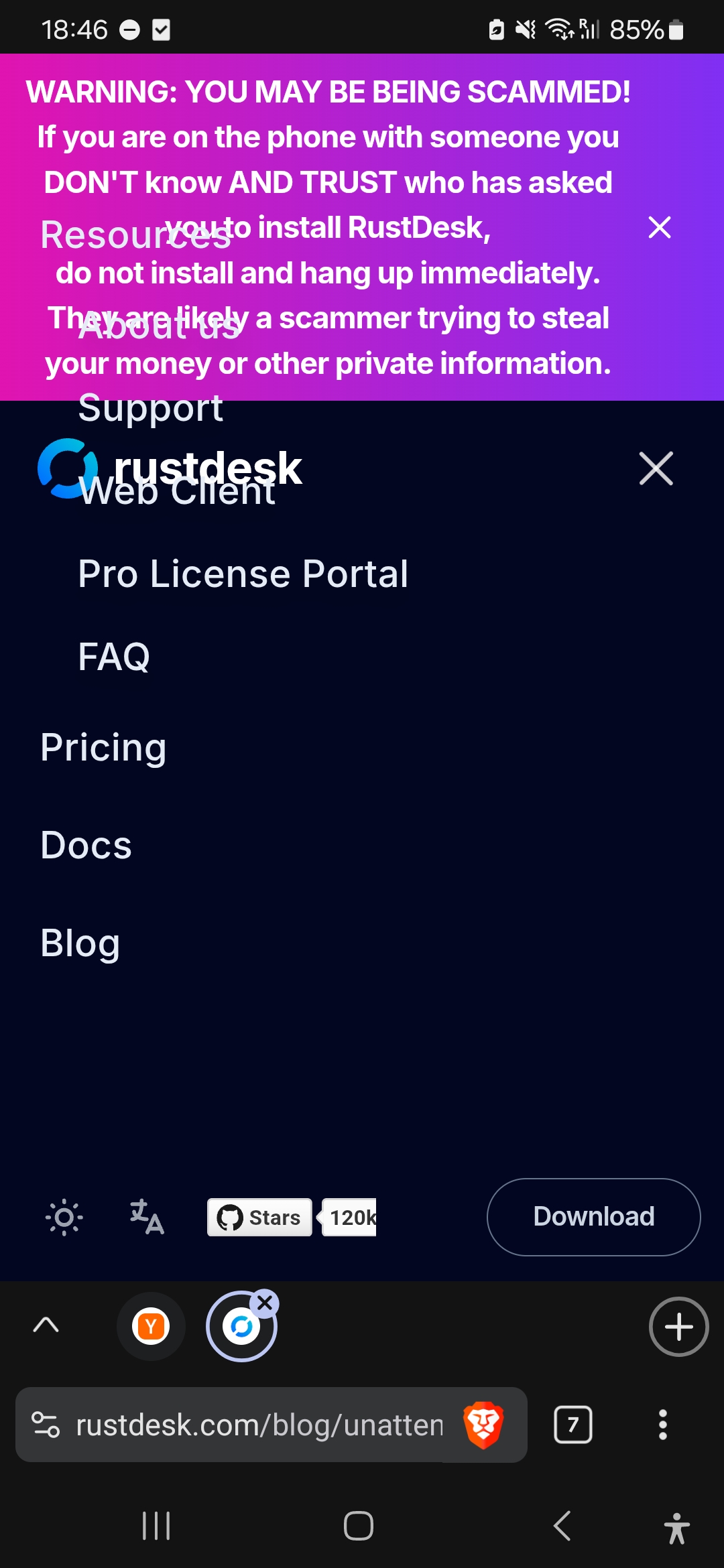
Does my screen have to be on?
How does this work on a technical level?
Does it framebuffer grab the current session and inject input events?
Usually the way to be able to even get the login screen is to use DRM/KMS based capture and use uinput for device emulation. It doesn't strictly need root but it does need privileges a user wouldn't have, like access to the DRM card nodes and uinput device. Sunshine does it this way.
It entirely sidesteps the problem of X vs Wayland, although this does mean the unattended physical seat can be physically taken over while you are remote.
As I remember, generic DRM interface allows only writing to a framebuffer and not reading from someone's else framebuffer. Do they use some vendor-specific APIs?
Yea I need to know this before I even consider something like this. I'm guessing it's a daemon that runs as root in the background.
RustDesk should fix their password requirements: https://github.com/rustdesk/rustdesk/discussions/2888
It's open-source, so just build it yourself with the tiny change. Something this trivial could be done with a 30 second prompt at this point, so there's not even an excuse of "too much effort".
I will note that the XKCD password scheme being proposed there is, in fact, completely insecure. A modern consumer GPU can crack "four random English words" in a day. You can argue that it's the user's choice to be allowed to use insecure passwords, but arguing that that scheme is actually secure is just wrong.
> A modern consumer GPU can crack "four random English words" in a day.
Let's run the math:
EFF's long wordlist[0] (the one used by Bitwarden's passphrase generator) has 7776 words, which is about 13 bits of entropy per word (log2(7776) = 12.92). A 4-word passphrase then has 51.7 bits of entropy, meaning there are 2^51.7 possible options for the passphrase, which is 3.66E15 possible options.
For reference, a password with all completely random characters and symbols, for each character you have 70 possibilities, or about 6 bits of entropy. An 8-character completely random password (no words or the usual patterns) then has about 49 bits of entropy, which is less than a 4 word passphrase.
About the time it takes to crack it, assuming you can test an average of 1 password per μs (you probably can't, as passwords are usually stored using key derivation functions[1][2] with work factors tweaked for current hardware) it would take ~116 years to crack it. I usually see 5-passphrase recommended nowadays, which would multiply the required effort by 7776.
Sure, a 16-character random password has a lot more entropy, but it's also a lot harder to interact with (reading, comparing, typing) if you end up needing to, and it's still easier to crack than an 8-word passphrase.
[0] https://www.eff.org/dice [1] https://en.wikipedia.org/wiki/Key_derivation_function [2] https://cheatsheetseries.owasp.org/cheatsheets/Password_Stor...
> assuming you can test an average of 1 password per μs (you probably can't, as passwords are usually stored using key derivation functions
You are not (usually) in control of what services use to encrypt your password, and most software in the world uses a basic hash like MD5 or SHA-256 rather than a key derivation function, meaning you are wildly, wildly underestimating the number of guesses per second here. To suggest that passwords are "usually" stored like that is just wildly incorrect. Only well-educated, high-quality engineers who care about security, a vanishingly tiny portion of the industry, even think about things like this. I still run into government services that e-mail me my password in plaintext.
---
Sorry, but edit attaching a reply to another comment here because HN rate-limits me:
> This is just completely false.
My mid-tier laptop GPU can crack the usual wordlist in under 12 hours against MD5 (46 billion guesses per second), or about 3 days against SHA-256 (6.5 billion guesses per second). A desktop 4090 would likely crack SHA-256 in under a day (on average).
I make claims with confidence because I am speaking about facts. Why are you making claims with confidence when you have no idea what you're talking about? The quality of discourse on this site is so, so low.
What you said:
> A modern consumer GPU can crack "four random English words" in a day
What you're saying now:
> My mid-tier laptop GPU can crack the usual wordlist in under 12 hours against MD5 (46 billion guesses per second)
So your response to the plain mathematical fact that, no, your consumer GPU cannot crack "four random English words" in a day, is that your consumer GPU can crack four words chosen from a list of a few thousand, in a day. Followed by personal attacks. Okay.
Great, then use 5 words instead.
Trying to pick a strong password assuming the service you’re signing up for doesn’t care about security is pointless. You’ll be pwned regardless of what you do.
> most software in the world uses a basic hash like MD5 or SHA-256 rather than a key derivation function
For passwords? Where do you get that information?
Experience? Looking at codebases? The one in question does, in fact, use SHA-256. HN is a bit of a bubble because there's a large demographic of FAANG-tier employees here who work at big tech or unicorn startups, but most software in the world is not made by FAANG or unicorn startups, and the standards are way, way lower than you might think they are if you're used to living in this bubble. For software development practices in general, not just password storage. I think it's taken for granted that every single person on HN uses VCS, but even that is a luxury in many real-world working environments outside of SV.
Even if only 10% of the services you use use MD5/SHA-256 (although I certainly would expect it to be >50% if we could do a large-scale study), why accept your password being easily compromised 10% of the time?
> A modern consumer GPU can crack "four random English words" in a day. [...] but arguing that that scheme is actually secure is just wrong.
Let me do just that!
This is a networked service. You send your password (or a hashed form) to it, and it validates it. You don't have the local hash to bruteforce it offline.
Even if we only consider the top 10k english words, it's 10000^4. It's going to take years to bruteforce this over a network because you'll go through so many rate-limits, cooldown periods, and outright bans that it's questionable whether it's even possible.
Virtually any password other than "password123" is fine if you're rate limited to a few guesses per day by a networked service. Passwords should be secure against the inevitable data breach when the service you're using loses their hashed password database, which happens on a routine basis.
Seems like the only real issue here is that rustdesk uses SHA256 instead of argon2.
> This is a networked service. You send your password (or a hashed form) to it
Hopefully neither. But given everybody involved in VNC seems to be the same batch of clueless morons who built all those PHP web forums twenty years ago with MD5 as the password hash, who knows what they cobbled together. Maybe an expert can chime in about what actually happens here?
Yes, for a sensible scheme this can't work.
I’m not an expert in RustDesk, but I did take a quick look at the code, and it’s filled with massive red flags like [1], where it appears the general mechanism is SHA256(SHA256(password++salt)++challenge). I can’t even tell if the whole thing is vulnerable to trivial MITM ([2] makes it sound like it might be; while investigating, I ran into the concerning comment [3], “fall back to non-secure connection in case pk mismatch”). I can’t find any actual documentation of the protocol and it’s a custom thing built on NaCl boxes, yikes. [4] generates a keypair on the fly for a new connection to sign the box containing the symmetric key generated at the same time…
I would recommend never using this software.
[1]: https://github.com/rustdesk/rustdesk/blob/7aa98d43cf1962a7a2... [2]: https://github.com/rustdesk/rustdesk/discussions/8392 [3]: https://github.com/rustdesk/rustdesk/blob/7aa98d43cf1962a7a2... [4]: https://github.com/rustdesk/rustdesk/blob/7aa98d43cf1962a7a2...
> A modern consumer GPU can crack "four random English words" in a day.
This is just completely false.
Did you even check what hash they are using?
SHA-256. Did you? My point isn't constrained to this exact service, though. My point is that the XKCD-style passphrase is in general not secure. If you make a habit of using it, assuming that the service in question will take care of securing it super duper safely on your behalf, you will get bitten when a service doesn't do this.
If character class constraints are enforced then that password becomes incredibly strong though - e.g. require a capital, and special characters and a number.
Plenty of sentence passwords meet that but now the probability space has exploded.
> A modern consumer GPU can crack "four random English words" in a day.
Sure, if you can rely on users using a specific format. The joy of the xkcd technique is you don't need to tell other people what yours is.
But, people just aren't going to remember strings of gibberish. Expecting users to do this is just silly.
The "joy of the XKCD technique" is that it prescribes a specific format millions of people will use, and it's so trivial to break that you can throw it into your cracking algorithm at virtually no cost.
If you were willing to use a bespoke, more secure variation of it, you could include a capital letter and a number rather than filing an issue on a repo insisting that you be allowed to use exactly the insecure variation.
I think you are both greatly overestimating the number of people who remember what xkcd is and their willingness to do what a webcomic prescribes uncritically. What you describe as "bespoke" is likely the normal way someone might use it: with their chosen format.
For instance, I have multiple separator characters, multiple beginning and end characters, and numbers places at specific places, and arbitrary casing. That may be overkill but it's still essentially the xkcd format.
> I think you are both greatly overestimating the number of people who remember what xkcd is and their willingness to do what a webcomic prescribes uncritically
XKCD's youtube videos get millions of views each. It is a very popular comic, and that particular password advice has spread beyond it.
> What you describe as "bespoke" is likely the normal way someone might use it.
And yet the issue in question is about someone who refuses to adapt it.
The user in question might have their own personal format that doesn't meet the RustDesk constraints. E.g. they may not use capitals, but use `word1$word2&word3@word4`.
Tayloring your format to the requirements of each site is a step towards defeating the utility of the system; now the user needs to remember some arbitrary hard-to-remember details for each password.
Although having a standard format for your passphrases across sites removes some of the advantages over just using the exact xkdc format (when one of your passwords is compromised and attackers can guess your custom format elsewhere now)...
This is a non-issue with a password manager
"Look up - there's 7 polywaffles in the sky!"
That phrase will pass almost every single password requirement, and no one is going to crack it by brute force dictionary attack.
> And yet the issue in question is about someone who refuses to adapt it.
Does this person exist?
Does this work without a screen on the remote machine? I have a server with SSH access if like to view for bespoke tasks now and then.
Funny that the video in the blog post still needs X. I will see myself out....
No need to announce
RustDesk works so much better and easier than vnc and other vendored solutions. No need to open ports, no need for vpn, it just works, no account BS, no vendor lock in BS.
I have used RustDesk for years, also run my own lookup/relay server so I do not need to rely on the public lookup server
While everything else gets enshitified RustDesk just keeps getting better
Definitely a lifesaver for tech support!
And the fact it's self-hosted is priceless.
Without self-hosting, how can I be sure that the middleman server layer won't affect my security?
wonder if it can support gaming and sounds too ?
Okay. The feature I'm waiting for is the self-hosted web client.
Is Wayland finally feature complete to xorg or are they still refusing to?
so this means I can be on a vacation, turn on my ubuntu desktop remotely, login and control it ? I have a strong need for this as my desktop is also a server
For a remote Linux system you can also do a lot over plain SSH as well.
You can already do this with VNC or Xpra (the latter is a screen/tmux for graphical applications).
so whats the edge that rustdesk that offers ? gaming ?
They've been working on Wayland for what, nearly 20 years now, and it still has not reached feature parity with 1996 Windows NT?
To be completely fair it's 2007 Windows NT they haven't caught up with.